 BeatCut
Your clips, cut on every beat.
Drop in your videos and your music: BeatCut finds the tempo, locks every cut to the rhythm and adds the effects. A ready-to-post edit in just a few minutes.
Windows 10 and 11 · Your videos never leave your computer
On Mac: Apple Silicon (M1 and later) · Intel Mac
BeatCut listens to your music, finds the tempo, spots the downbeats and cuts your clips right on them.
Split screens, effects, lyrics, overlays: everything hits on the beat. You just pick the style.
No editing skills needed. Drop in your videos and your music, pick a look, export for TikTok, Reels, Shorts or YouTube. A ready-to-post edit in just a few minutes.
- Drop in your filesYour clips and your music, all at once. BeatCut detects the tempo and the downbeats, and picks the best moments.
- Pick a lookHover over a look to try it live on your clips. One click to keep it.
- Export and postOne button sets the format for each platform. Fast export, accelerated by your graphics card, or send it to After Effects, Premiere or DaVinci to finish the edit.
- Neon 3-view
- Rave split
- REC camcorder
- Gaming
- Fisheye
- Glitch
- Shockwave
- 3D lyrics
- TikTok
- Instagram Reels
- YouTube Shorts
- YouTube
- 9:16 · 16:9 · 1:1
- Up to 4K and 60 fps
- After Effects · Premiere · DaVinci

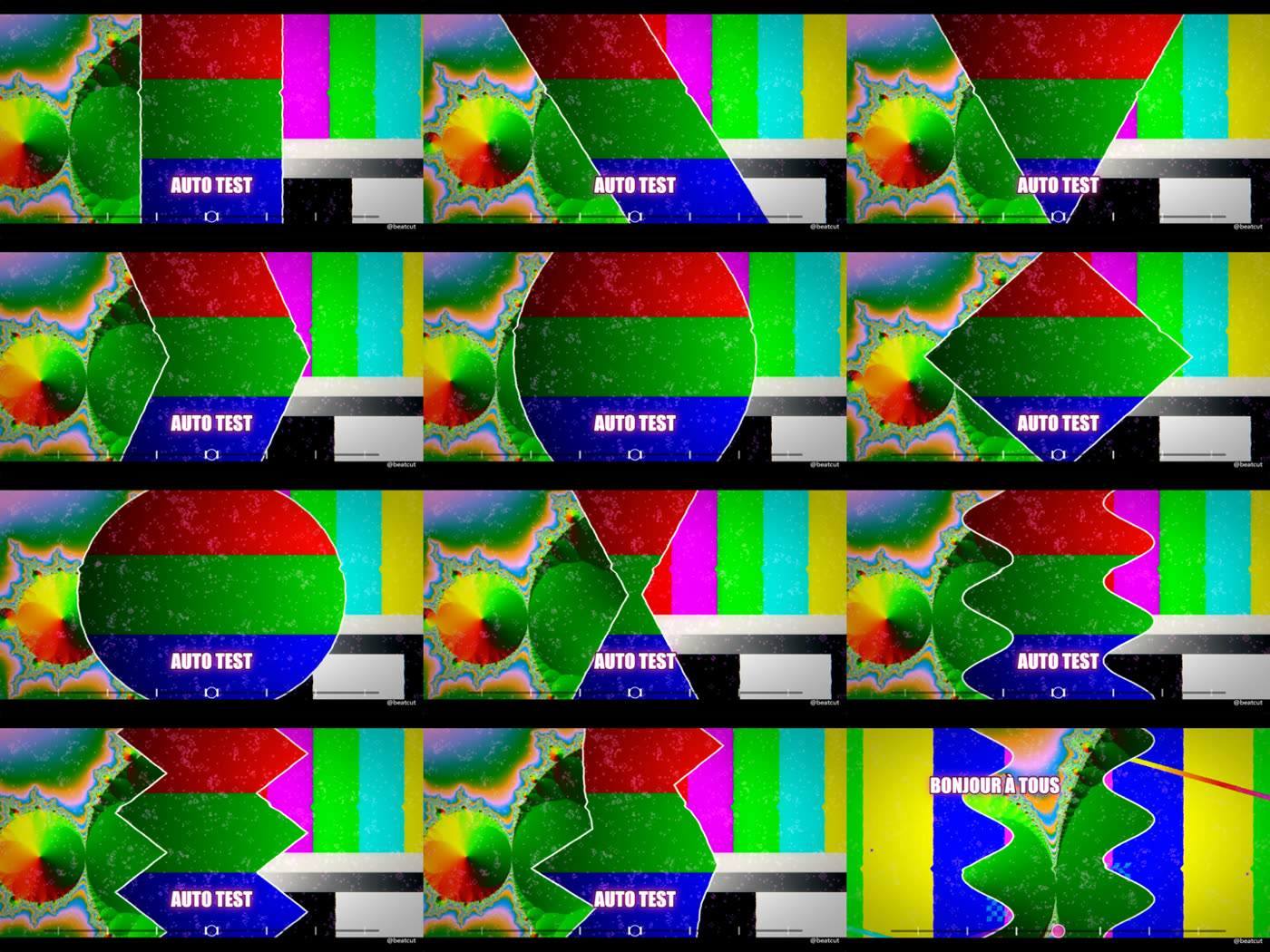
Split screens and cutouts
1, 2 or 3 views, straight or V-shaped, diamond, waves, shards… with solid or neon borders that follow the effects.
Effects on the beat
Zoom, shake, glitch, flash, fisheye, shockwave, dives, views blacking out one by one, keyframes just like in Premiere. Mute and Solo on every effect to compare, one-click reset.
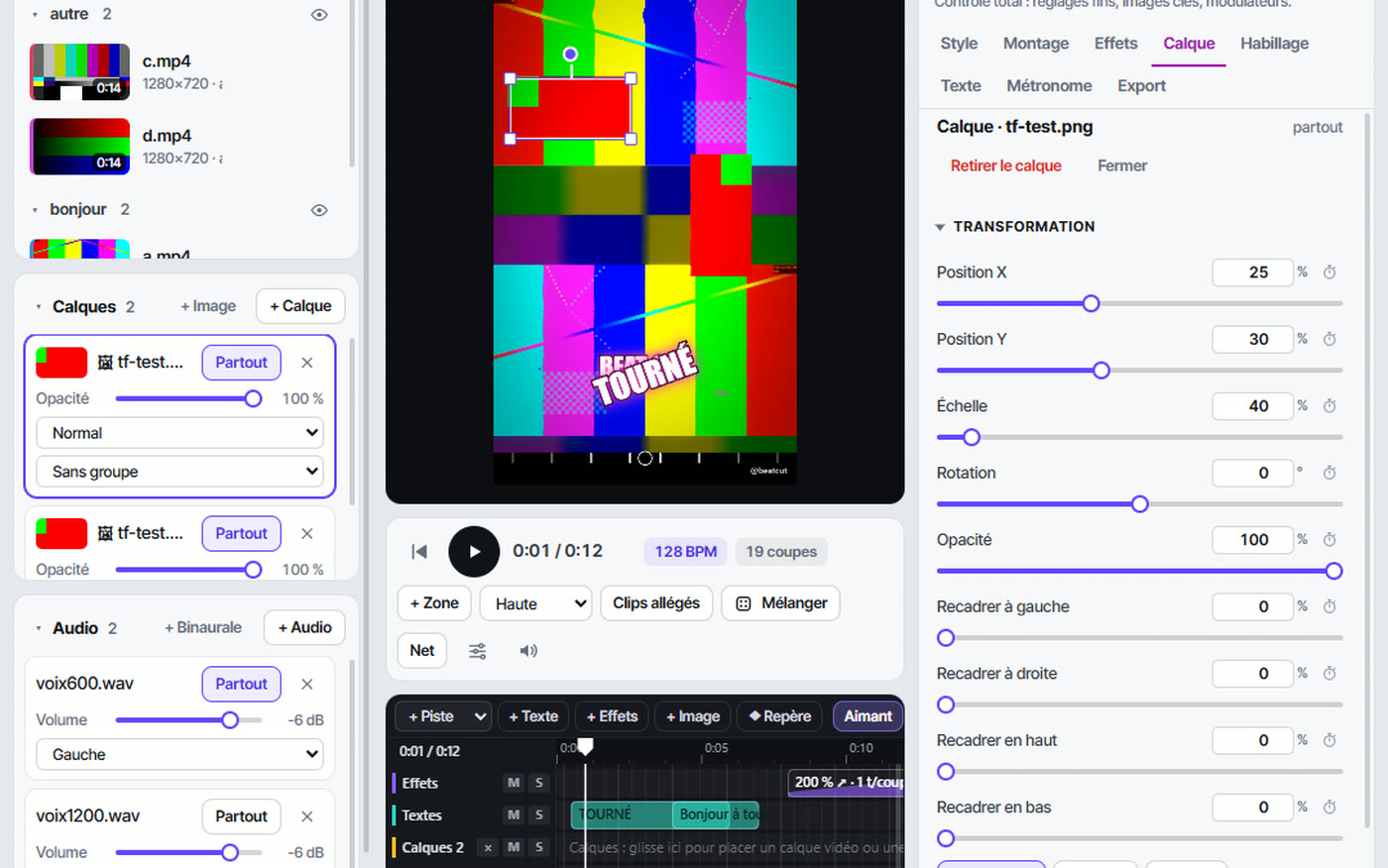
Pro Max mode Pro edition
A multitrack timeline like in pro software: as many text, effect and layer tracks as you want, Mute and Solo, markers, drag and drop. Place your images on the video, then move, resize and rotate them right in the preview, with keyframes. Classic shortcuts and export to After Effects, Premiere Pro and DaVinci Resolve.

Lyrics and text on the beat
BeatCut finds the synced lyrics of your track and places them right when they're sung, in 3D, word by word or letter by letter. To wrap up, an end page with the names of the people in your edit: scrolling credits, a grid or one name at a time.

Video-game-style overlays
HUD gauges, 8-bit bars, crosshairs, REC camcorder, and a metronome locked to the beats, the cuts or the instruments (kick, snare…), customizable with your own images and sounds.
Hypno mode Pro edition
A second interface for creating hypnosis sessions, with or without music: write your script, pick a built-in voice in French, English, Spanish or German, use your ElevenLabs or Fish Audio key, or your own recordings. Subtitles synced to the voice, binaural sounds, generated animated backgrounds or your own clips.
Start
for free.
You can try every feature in the preview. Your edition decides what you can export.
Free
To get started
- All looks and effects in the preview
- 720p export up to 1 minute
- Watermark and short BeatCut ad
- Beat-synced cuts, styles, text
- Multitrack timeline, end credits page
Plus
For posting regularly
- 1080p export, unlimited length
- No watermark, no ad
- Cuts on the instruments (kick, snare…)
- Lenses, shaped cutouts, neon
- Overlays, loading bars
- Metronome on the beats, the cuts or the instruments
- Advanced transitions, zones, placed text
Pro
To go all the way
- Everything in Plus, and:
- 4K and 60 fps export
- Image and video layers, edited on the preview
- Keyframes: position, size, rotation, effects
- Export to After Effects, Premiere Pro, DaVinci Resolve
- Views blacking out, mirror symmetry
- Speed synced to the beat, 3D audio
- Hypno mode: voices, script, binaural sounds
Prices include VAT. Secure payment through Lemon Squeezy, our official reseller (VAT and invoices included). Subscriptions can be canceled at any time. Terms of Sale
Already a customer? Find your keys and manage your subscription in your customer account.
Your videos never leave your computer.
Editing and exporting happen on your machine, accelerated by your graphics card. BeatCut only goes online to check your license, look for updates and, if you ask it to, find the lyrics of a track.
Your clips and music are never uploaded.
Monthly or yearly, cancel anytime. Your projects stay intact.
Exports accelerated by your NVIDIA, AMD or Intel graphics card.
Frequently asked questions
Are my videos uploaded to the internet?
No. All the editing and exporting happens on your computer. BeatCut only goes online to check your license, look for updates and, if you ask it to, find the lyrics of a track (title and artist only).
What computers does it run on?
Windows 10 or 11, 64-bit. A recent graphics card speeds up exports (NVIDIA, AMD or Intel), but it isn't required. A Mac version is coming soon.
On how many computers can I use my license?
A license can be active on one computer at a time. To switch PCs, click “Release this computer” in BeatCut, then activate your key on the new one.
How do I get my license?
By email, right after payment. In BeatCut: click the edition button in the top right, paste the key, then “Activate”. That's it.
I lost my key. How do I get it back?
In your customer account: enter the email you used to order, you'll get a sign-in link and find all your keys, the computers they're activated on and the link to manage your subscription. You can also release a computer you no longer have.
I support BeatCut on Patreon. Do I get a license?
Yes, depending on your tier. Go to the BeatCut Patreon page and sign in with Patreon: your key shows up right away. It stays active as long as your Patreon membership does, and you'll get the same key back if you return.
Can I cancel my subscription?
Yes, at any time, using the “Manage my subscription” link in your order email. Your edition stays active until the end of the paid period, then BeatCut switches back to Free: your projects stay intact.
Can I finish my edit in After Effects, Premiere or DaVinci?
Yes, with the Pro edition. BeatCut exports an After Effects composition (.jsx script), a Premiere Pro sequence or a DaVinci Resolve timeline: clips cut at the same spots, layers, text, transforms and markers on the downbeats. You can also add the final BeatCut video as a reference.
Windows shows a warning during installation?
New software can trigger the SmartScreen screen until Windows gets to know it. Click “More info”, then “Run anyway”. The installer doesn't ask for administrator rights.
Am I allowed to use any music?
BeatCut edits the files you give it: it's up to you to make sure you have the rights to the clips and music you publish. Social networks often offer their own library of royalty-free sounds.